

Mail Mergea worqinc app for monday.com
Personal emails to every contact on your monday board, from your own inbox.
Pick a board, write once with merge fields, preview every email and send from Outlook or Gmail. Replies come straight back to you.
- Works with Outlook and Gmail
- 14-day free trial
- No card until you choose a plan
No more exporting to Excel
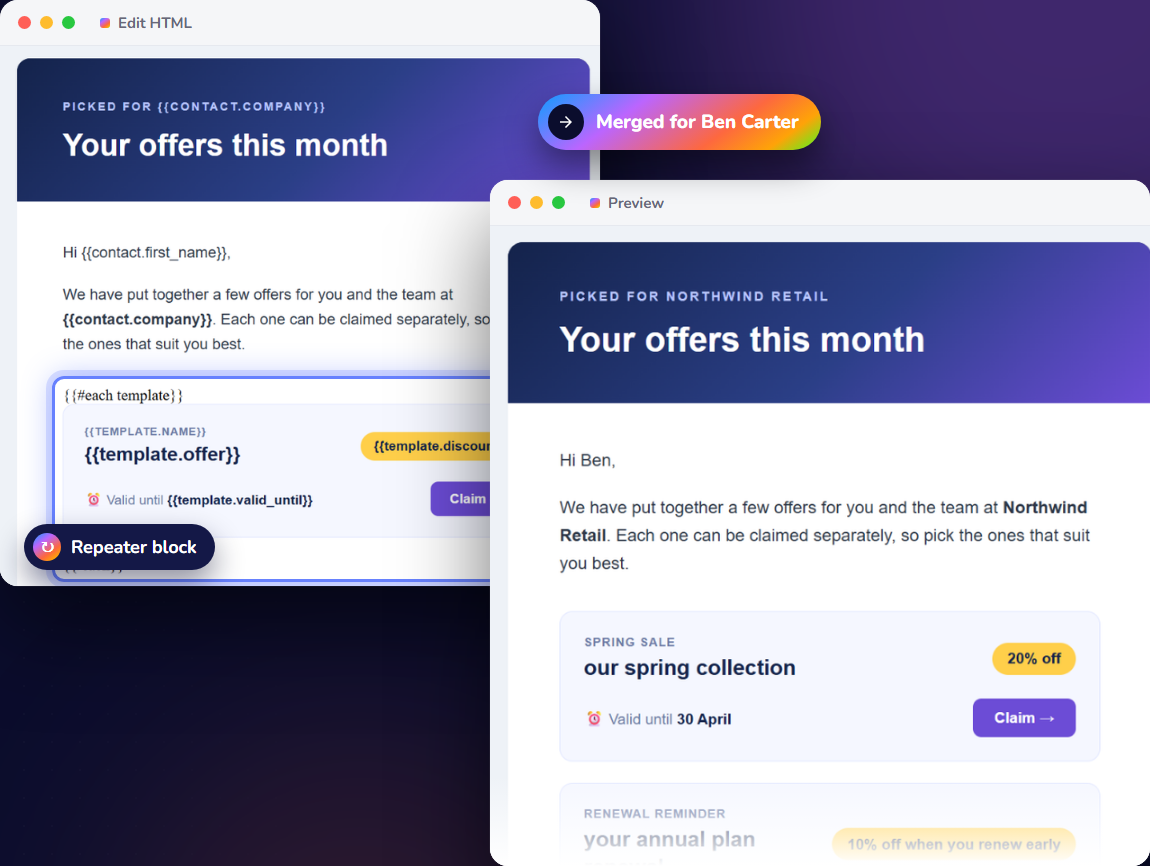
Your contacts stay on the monday.com board. No exports, no Word mail merge, no stale copies.
No copy-paste, one email at a time
Write once with merge fields, then send a personal email to every contact you tick.
No separate marketing tool
One-to-one emails from your own mailbox, not newsletters from a bulk sender.
From board to inbox in four steps
Everything happens inside monday.com, in a Board View.
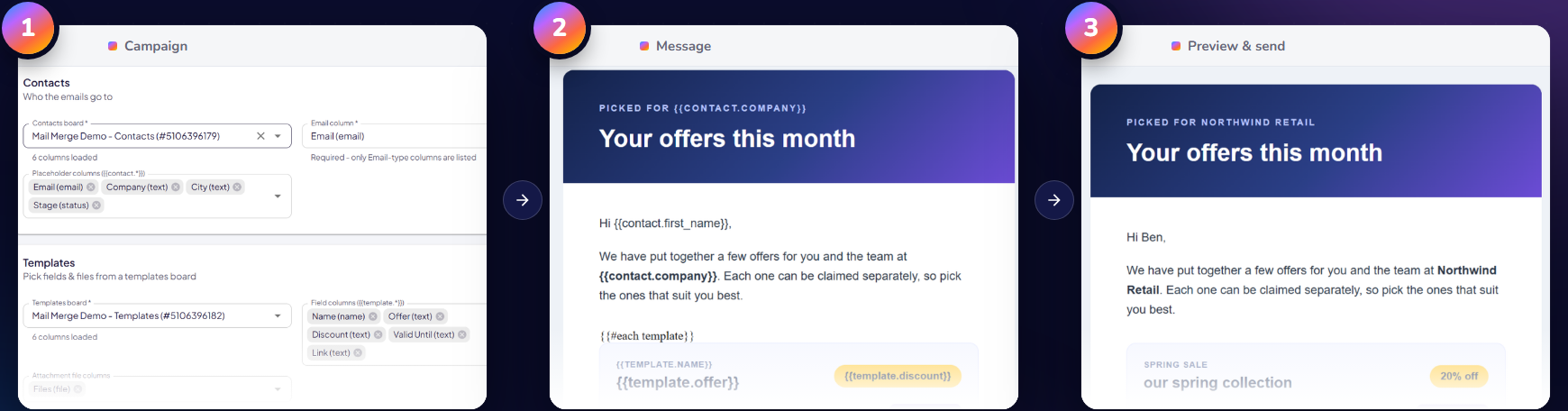
Connect once
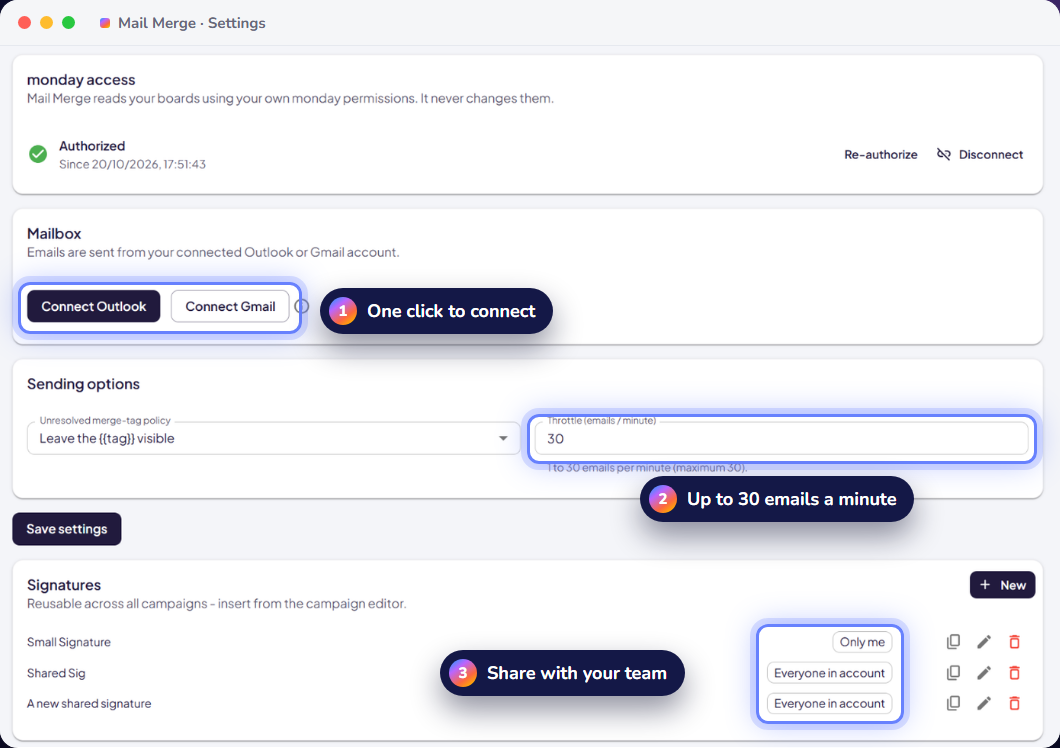
Authorise monday.com, then connect your Outlook or Gmail mailbox in Settings.
Pick your boards
Choose your contacts board and its Email column, and optionally a templates board, for example one row per offer or language.
Design the email
Write the subject and body with fields like {{contact.name}} and {{template.offer}}, plus signatures and repeater blocks.
Preview and send
Tick contacts and templates, check every merged email, click Send and watch live progress.
Everything you need for one-to-one email at scale
Your mailbox, your reputation
Sent from your own Outlook or Gmail
Emails go out from your connected mailbox, so they land in your Sent folder and replies come straight back to you.
- Send from an alias, a Send As address or an Outlook shared mailbox (kept in its Sent Items)
- On Gmail, pick any of your verified Send mail as addresses
- Paced sending, up to 30 emails a minute, which you can lower in Settings
- Reusable signatures, private or shared with your team
Campaigns built from your boards
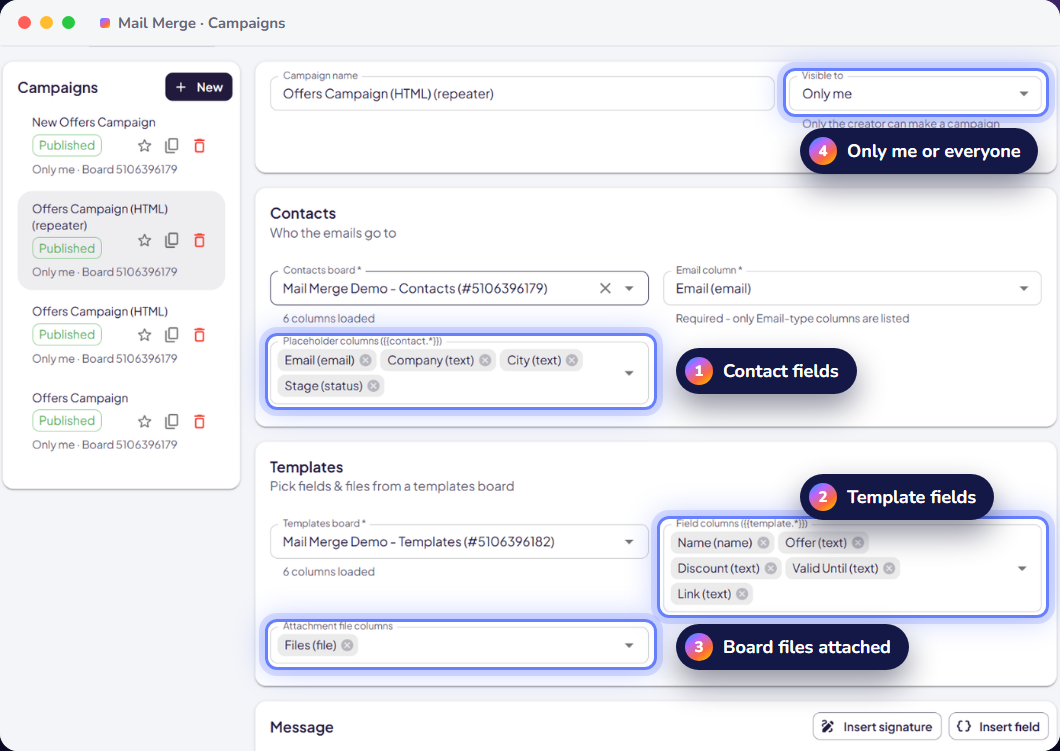
Turn any column into a merge field
Point a campaign at a contacts board and, if you like, a templates board. Send one email per contact per template, or combine several templates into one email with a repeater block.
- Subitems work too, for example the lines of an order
- Also To, CC and BCC from other email columns, subitems, typed addresses or a text column split by a delimiter
- Mirror and connect-boards columns can be fields
- File columns on the templates board become attachments
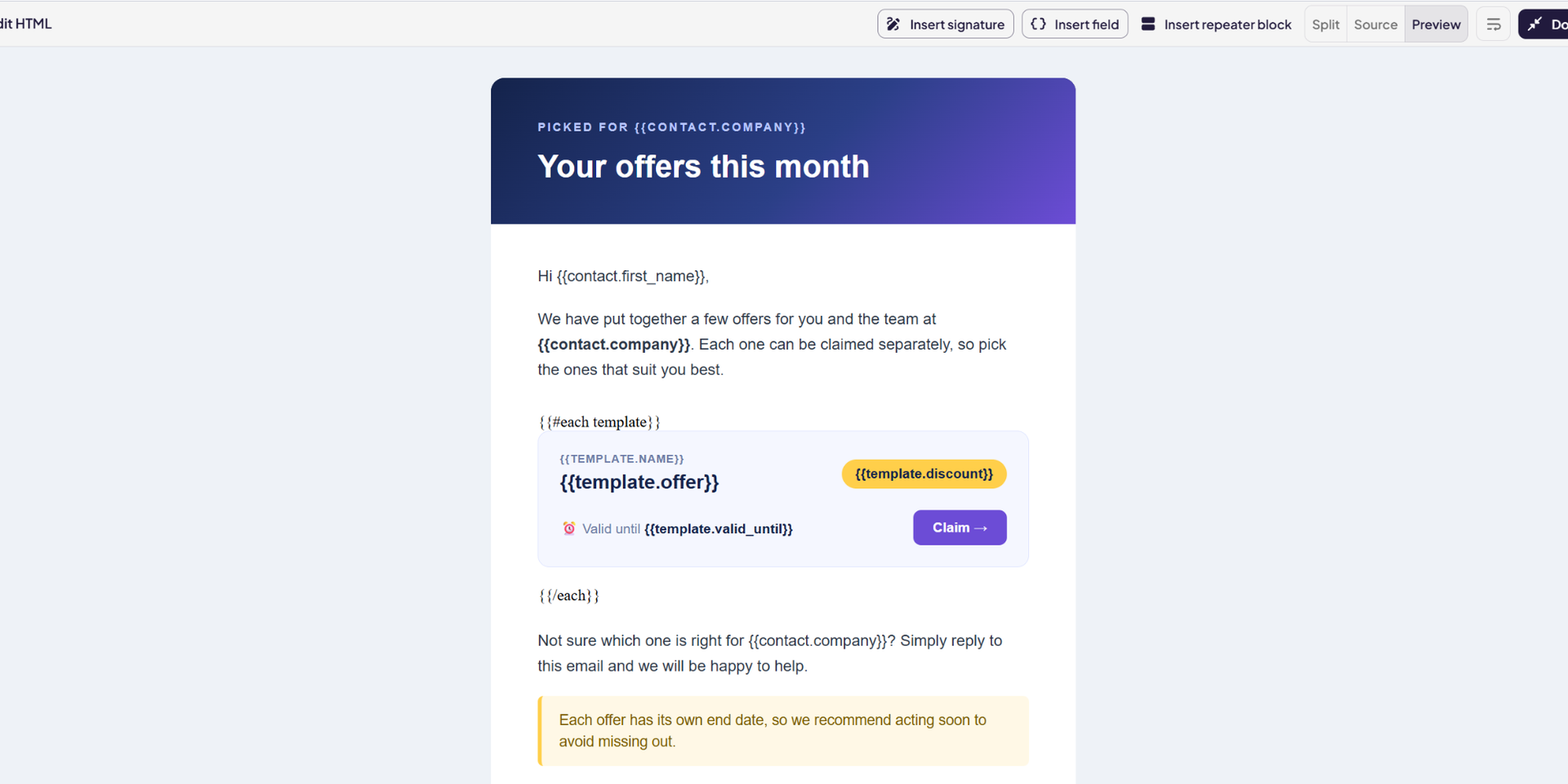
Designed emails that survive Outlook
Visual editor or full HTML
Write in the visual editor, or switch to HTML mode with a live preview and a full-screen editor. Bring your own design from any email designer.
- Import an .eml or .html file with its embedded images kept
- Images are sent inline, so Gmail and Outlook show them
- Insert fields, signatures and repeater blocks from the toolbar
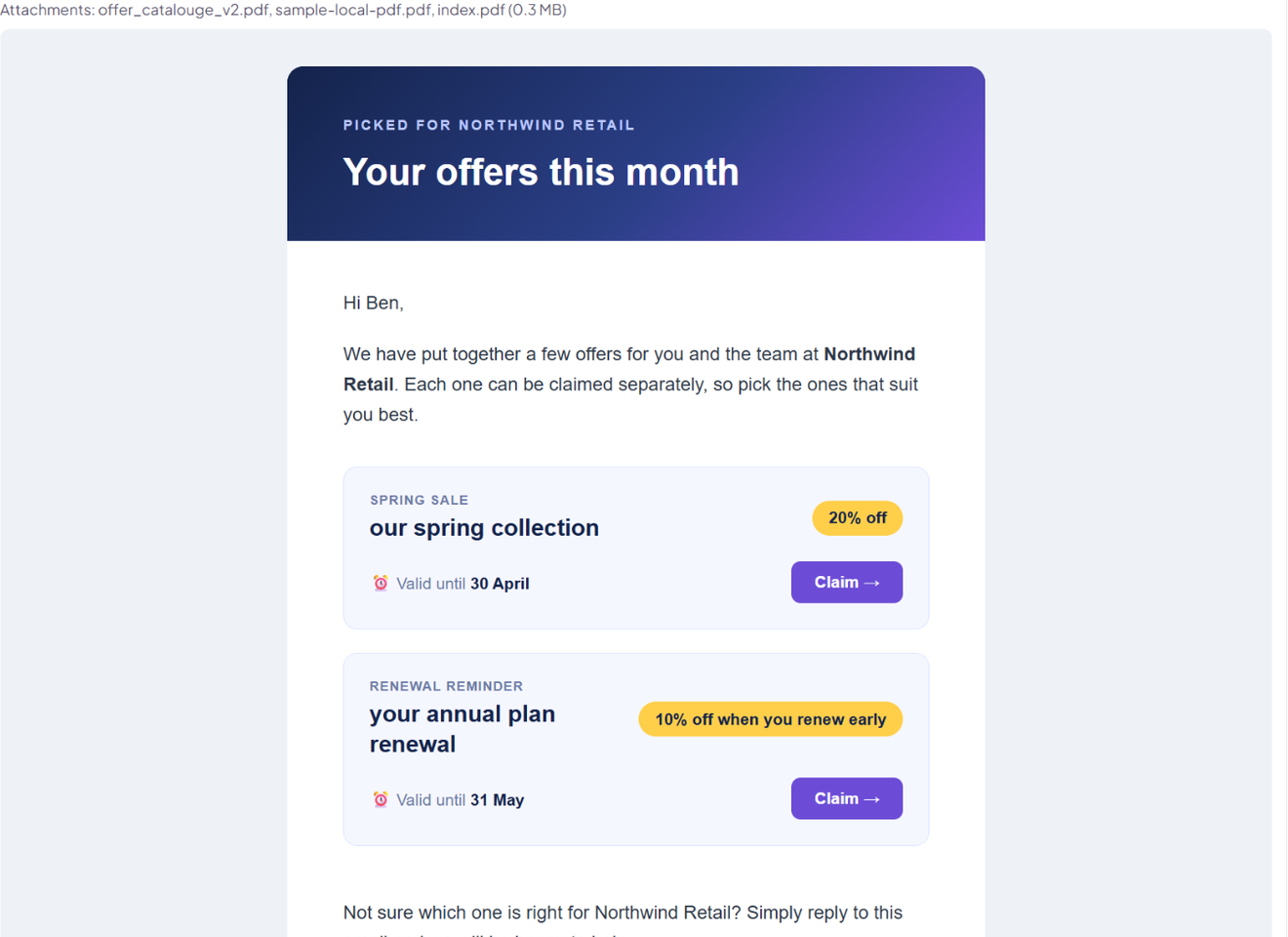
Preview before you send
See every email before it goes out
Check each merged email with its attachments and size before anything is sent. While it sends, follow live progress with sent and failed counts and the time remaining.
- A send record for every contact, with the reason if one fails
- Choose what happens to a merge field that has no value
Attachments that just work
Upload files for every email, up to 10 MB per campaign, or use a file column for per-template files. Public Google Drive, OneDrive, SharePoint, Dropbox and Box links are fetched and attached; private links become link cards.
AI assist
Improve your text or draft a new email, simple or fully designed HTML, with monday.com AI. Merge fields, repeater blocks and images are protected. Uses your monday.com AI credits, which are not included in the price.
Share with your team
Keep a campaign private or share it with your whole account: others can use and duplicate it, only the owner edits. Star favourites and hide the ones you do not use.
Your data stays in monday.com and your mailbox
Contacts are read from your board with your own monday.com permissions and never copied.
Campaigns, settings and signatures are stored encrypted in monday.com’s own hosting.
Mailbox tokens are encrypted with AES-256-GCM and never sent to your browser.
Send records are deleted automatically after 7 days. Nothing is written back to your boards.
Uninstalling Mail Merge deletes your data, including stored tokens.
Data is separated by monday.com account, so one account never sees another’s.
Read how Mail Merge handles Google user data in its privacy policy.
One plan, everything included
$2 per seat a month, or $20 per seat a year. Start with a 14-day free trial.
$2 per seat / month
Billed every month. Switch to yearly any time to save.
Get Mail Merge14-day free trial. No payment details until you choose a plan.
- Unlimited campaigns, templates and signatures
- Send from your own Outlook or Gmail mailbox
- Merge fields from your contacts and templates boards
- Attachments, inline images and imported designed emails (.eml / .html)
- Live progress and a send record for every contact
- Sending volume limited only by your mailbox provider’s daily limits
Priced by your monday.com seat tier
Mail Merge is billed through monday.com, at the same $2 per seat for every account size. The subscription covers every seat in your account, so pick the tier that matches it.
| Up to (seats) | Per month |
|---|---|
| 3 | $6 |
| 10 | $20 |
| 15 | $30 |
| 20 | $40 |
| 25 | $50 |
| 30 | $60 |
| 40 | $80 |
| 50 | $100 |
| 75 | $150 |
| 100 | $200 |
| 150 | $300 |
| 200 | $400 |
| 250 | $500 |
| 300 | $600 |
| 400 | $800 |
| 500 | $1,000 |
| 750 | $1,500 |
| 1,000 | $2,000 |
| 1,500 | $3,000 |
| 2,000 | $4,000 |
| 2,500 | $5,000 |
| 3,000 | $6,000 |
| 4,000 | $8,000 |
| 5,000 | $10,000 |
Prices in US dollars, excluding VAT. Payment, invoices and VAT are handled by monday.com, and the price shown at monday.com checkout is final. Subscriptions renew automatically. AI assist uses your monday.com AI credits, which are not included.
Questions, answered
Do emails come from my own address?
Yes. Mail Merge sends through your connected Outlook or Gmail mailbox, so emails land in your Sent folder and replies come straight back to you. You can also send from an alias, an address you have Send As rights to, or an Outlook shared mailbox.
How many emails can I send?
Mail Merge does not cap your volume; your mailbox provider does, at about 10,000 a day on Microsoft and about 2,000 a day on Gmail. Sending is paced at up to 30 emails a minute to protect your mailbox’s reputation, and you can lower the rate in Settings.
Can each contact get different content?
Yes. Any column on your contacts board can be a merge field, and a templates board lets you send different offers, languages or attachments. A repeater block combines several templates into one email per contact.
Can I use emails designed in another tool?
Yes. Import the .eml or .html file from your email designer with its embedded images kept, or paste the source in HTML mode.
Are attachments limited in size?
You can upload up to 10 MB of files per campaign. Each email can carry about 3 MB on Outlook and about 24 MB on Gmail; an email over the limit is marked Failed with the reason.
Is my contact data copied out of monday.com?
No. Contacts are read from your board with your own monday.com permissions at send time and are never copied. Nothing is written back to your boards.
What does AI assist cost?
AI assist runs on monday.com’s AI and uses your account’s own monday.com AI credits, which are not part of the Mail Merge price. An account admin must allow AI for apps.
What happens if I cancel?
Mail Merge keeps working until the end of the period you have paid for, then sending stops. Your campaigns and settings are kept while the app is installed, so sending works again as soon as a new subscription starts. Uninstalling deletes them.
Send your first personalised campaign today
14-day free trial. No payment details until you choose a plan.